
Getting started with Audit Fox
Whoa! Tracking what’s broken and what isn’t in your HubSpot is about to get waaaay easier with Audit Fox 🦊.
At RevX, we’re revenue operators ourselves, so we built a tool to help us do even better for our clients.
We’re so excited to bring it to you now.
Now, before you get started, you’ll need three things:
- HubSpot admin access required: You'll need admin permissions to authorize the connection
- Valid email: For account registration and audit notifications
- 5 minutes: That's literally all this takes
Have all of this handy? Awesome. Let’s help you get set up and rolling.
Step 1: Create your Audit Fox account
There’s two ways to do this: login via Google or manually enter your details.
Google sign-up

- Click "Sign in with Google"
- Standard Google OAuth flow
- You’re good to go
Doesn’t get easier than this.
Good ol’ manual entry
- Click "Create account" tab
- Fill the basics:
- Name (2-30 characters each field)
- Email (needs to be real, we send notifications there)
- Password (8+ chars, mix it up with upper/lower/numbers/symbols)
Next up: We’ll get you connected with your HubSpot.
Step 2: Connect HubSpot
Alright, here’s the main stuff: getting your HubSpot to start sending data to Audit Fox.
Step 2.1: Go to your dashboard and hit the ‘Add account’ button

This’ll take you to a connector page within the app. That’s where you’ll see terms and data protection details.
Step 2.2: Check the agreement box and click ‘Connect HubSpot’

Step 2.3: Complete OAuth in the popup
Select the HubSpot account you want to connect with Audit Fox. You can add more accounts later if you’d like as well OR disconnect linked accounts with a couple of clicks! Easy.

Step 2.4: Back to your dashboard in seconds
Woop woop! We’re all set up. Time to start seeing what’s really going on with your HubSpot.
Is your data safe with Audit Fox?
Absolutely. Here’s why.
✅ Read-Only: We analyze, never modify
✅ Secure: No permanent storage of personal data
✅ Private: Zero third-party access
✅ Revocable: Disconnect anytime in HubSpot settings
Here’s our privacy policy. Do go through it in detail.
Step 3: Set up your profile
Audit Fox pulls in your name, email, and work address automatically at sign-up. Head to your profile settings to round it out with a few extras.
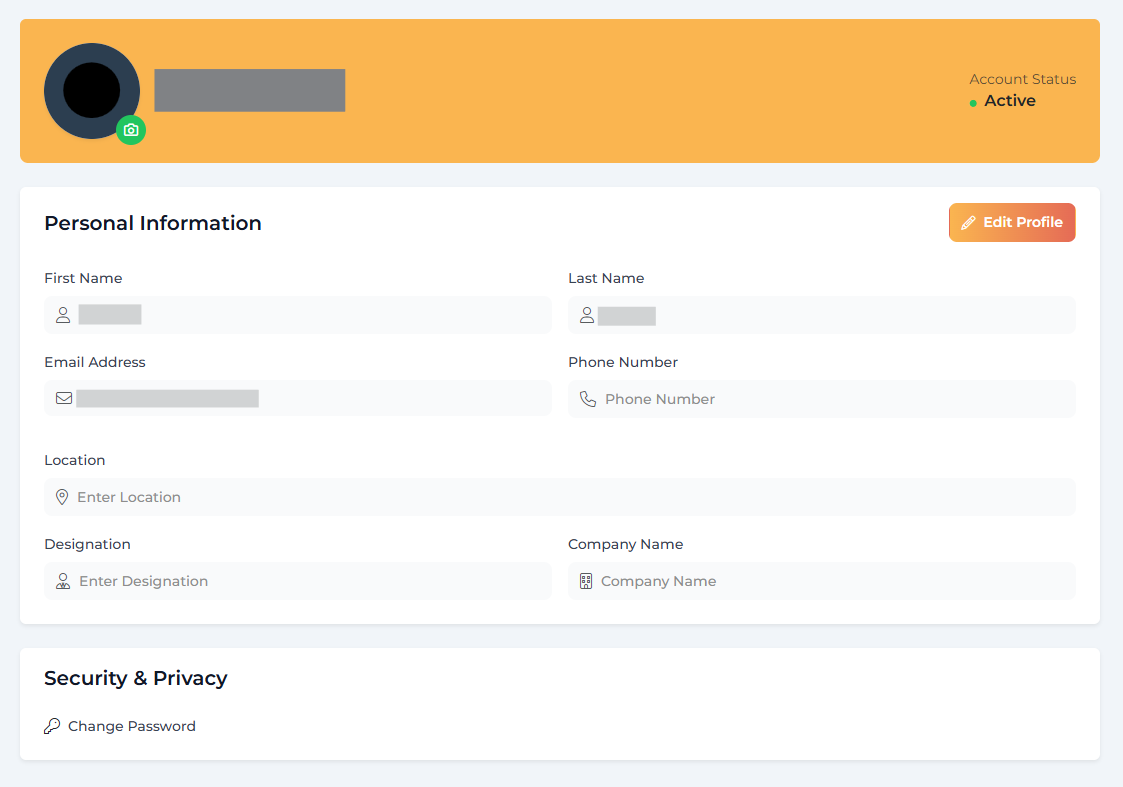
- Phone number
- Location
- Designation
- Company name
None of this is required to run Audit Fox as you need, but it's a nice-to-have for anyone on your team pulling reports and wanting your contact details attached.
Step 4 : Your dashboard walkthrough
Alright, now you’re on your very own Audit Fox dashboard. Here’s what you’ll see.
List of your connected accounts and associated details + audits

See that “Run Audit” button? That’s where you click if you want to run a brand new audit. You can also access the audits you’ve run previously, right from this screen.
Your HubSpot audit history and score overview

Go ahead and see the audits you’ve run in the past.
This is also where, once you’ve started a new audit, you can get real-time updates on analysis completion — right under the “Status” column. You can also download previous audits as PDFs or CSVs by clicking on the ellipsis-v icon (the three vertical dots).
Walk in the park.
Privacy and terms of use

Terms of use, privacy policy, consent disclaimer — all that important legalese. Spend some time going through this though, and reach out to us at shreyansh@gorevx.com if you have questions or concerns.
Subscription plans and available features

Audit Fox is in beta right now, getting feedback from our lovely early adopters, ironing out kinks, and coming up with new capabilities. So, for now, Audit Fox is completely free to use!
🔑Go ahead and take it for a spin — tell us what you think! We’re all ears.
Step 5: Run your first audit (the fun part)
Now, let’s get to the juicy bit: getting a deep X-ray of your HubSpot in minutes.
Step 5.1: Getting started
Click the ‘Run Audit’ button on your dashboard.

Now you’ll see an option to configure your audit. Select the objects you want to run an audit for. Hit "Run Audit" when ready.
Currently, Audit Fox will fetch and compute scores for the following data:
Core CRM objects
- Contacts: Essential info, business context, sales integration, email health
- Companies: Basic info, business intelligence, engagement tracking
- Deals: Fundamentals, sales process, activity tracking
Everything else
- Tickets, products, quotes, tasks, meetings, calls, emails, notes
- Marketing emails, landing pages, CTAs, forms
- Workflows, lists, files, ads
💡Pro tip: Hit that “Select All" for your first audit and get a full HubSpot health check. Once you’ve tried everything out and seen the results, you can run audits for specific objects only and get a more targeted X-ray.
Step 5.2: What happens next
- Audit runs in the background (close your browser, grab coffee)
- Processing time depends on your data size
- You'll get an email when it's done
- Results wait patiently for your return
The whole thing takes about 10-15 minutes if you’re running a full audit, depending on how large your database is.
Step 6: Understanding your results
Once your HubSpot audit is done, you’ll get an email alert that’ll take you back to Audit Fox. Here’s what you’ll see, and what you can take away from it all.
Decoding your score
We’ve set up quite a complex, multi-faceted scoring mechanism that takes into account multiple factors to gauge how well your HubSpot’s doing.
Overall health score (0-100)
- 90-100: You're crushing it. Kudos!
- 75-89: Solid foundation, minor tweaks needed
- 60-74: Some gaps to address
- Below 60: Time for some serious cleanup
Diving into the details
- Object breakdowns: Shows you individual scores for each area you audited
- AI summary: Highlights the biggest wins and most critical issues
- Critical issues: This is where you start fixing things. Audit Fox will classify your risks AND give you a complete list of “Critical Issues” (things you need to get after ASAP)
Export your findings
- PDF report: Clean format for stakeholders and meetings
- CSV export: Raw data for spreadsheet warriors and deeper analysis
How to get the most out of Audit Fox
We've built this thing and seen how teams actually get value from it. Here's what works, but ultimately you know your chaos better than we do.
Making it routine
- Monthly health checks are your friend: Set a calendar reminder. First Friday of every month, run a comprehensive audit. Track your scores over time and watch the trendline. Nothing feels better than seeing that score climb from 60 to 85 over six months because you actually fixed the broken stuff
- Triage like your funnel depends on it: Start with Critical Risk issues every single time. These are the data gaps that are actively costing you deals right now. High Risk can wait until next week. That missing phone number field? It's not why your conversion rates suck. But those 40% of deals without contact associations? That's why your attribution reporting is garbage
- Trend tracking = RevOps credibility: Screenshot your scores before you start fixing things. Document the improvements. When leadership asks what RevOps actually does all day, show them the before/after. "We took data quality from 62 to 89 in Q2" hits different than "we've been optimizing processes"
Making everyone else care
- Executive meetings: Lead with the PDF: Print it out if you have to. Executives love clean reports they can flip through. Start with the overall score, show the biggest problems, highlight what fixing them means for revenue. Don't get lost in the weeds about field mapping — keep it business impact focused
- Prove ROI with before/after scores: Nothing shuts up data quality skeptics like hard numbers. "After implementing these recommendations, our lead scoring accuracy improved and we saw a 23% increase in qualified opportunities." The audit scores give you the proof points you need to justify the time spent cleaning things up
- CSV exports for the data nerds: Your analysts and ops team want the raw data. Give it to them. Let them slice and dice, build custom reports, cross-reference with other systems. The CSV export becomes your source of truth for deeper investigations
Making troubleshooting easy
- Connection drama: Half the time it's permissions. Check if you're still a HubSpot admin. Check if your company locked down OAuth approvals. If you're getting weird errors, just disconnect and reconnect — it's not defeat, it's debugging
- Audit failures: Less common, still annoying. Empty HubSpot portals give us nothing to work with. If you just set up HubSpot last week, wait until you have actual data. Also, if someone revoked our permissions or your HubSpot admin status changed, the audit will fail silently. Check your HubSpot integrations page if things stop working
- Data security questions: Yes, it's read-only. No, we don't store your contact lists. Yes, you can revoke access instantly. No, we're not secretly selling your data. Show them the OAuth permissions if they need proof. Everything's encrypted in transit. We're not trying to steal your customer data — we just want to tell you how clean it really is
Making advanced moves
- Segment your audits: Don't always audit everything. Sometimes you just want to check deal data quality before a board meeting. Sometimes you're troubleshooting why marketing attribution is broken and only need to audit campaigns and contacts. Use the selective audit feature strategically
- Benchmark against yourself: Your Q1 score is your baseline. Your industry "best practices" don't matter if you're consistently improving. Focus on your own progress, not some theoretical perfect setup
- Use it for change management: New marketing automation? Run an audit before and after implementation. Major data migration? Audit first to know what you're working with. It's your documentation that changes actually improved things instead of breaking them
💡Pro tip: Audit Fox tells you what’s broken. But it can’t fix things for you just yet. So if you feel stuck, overwhelmed, or find yourself without a clear plan of action, remember that Audit Fox has been built by RevX — literally your go-to RevOps partners for when you need clarity and solid execution. Reach out to us here or drop an email to our CEO at shreyansh@gorevx.com.
Disconnecting the app
You can disconnect Audit Fox from your HubSpot account two ways: directly from Audit Fox or from your HubSpot account.
From Audit Fox:
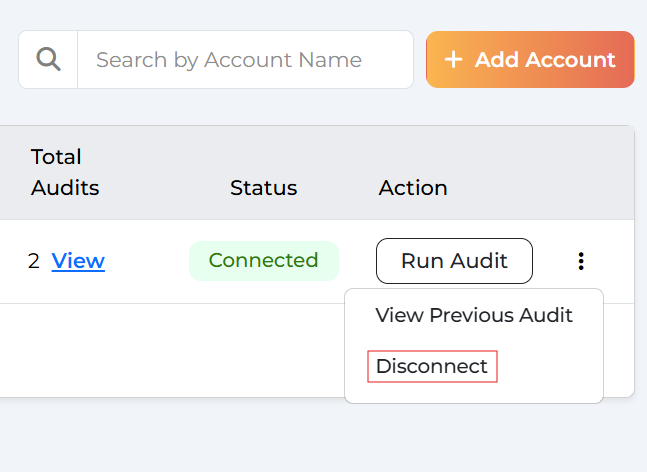
- Go to the Accounts tab on your dashboard
- Find the account you want to disconnect
- Click the three-dot option next to the ‘Run audit’ button
- Click Disconnect
- Confirm when prompted
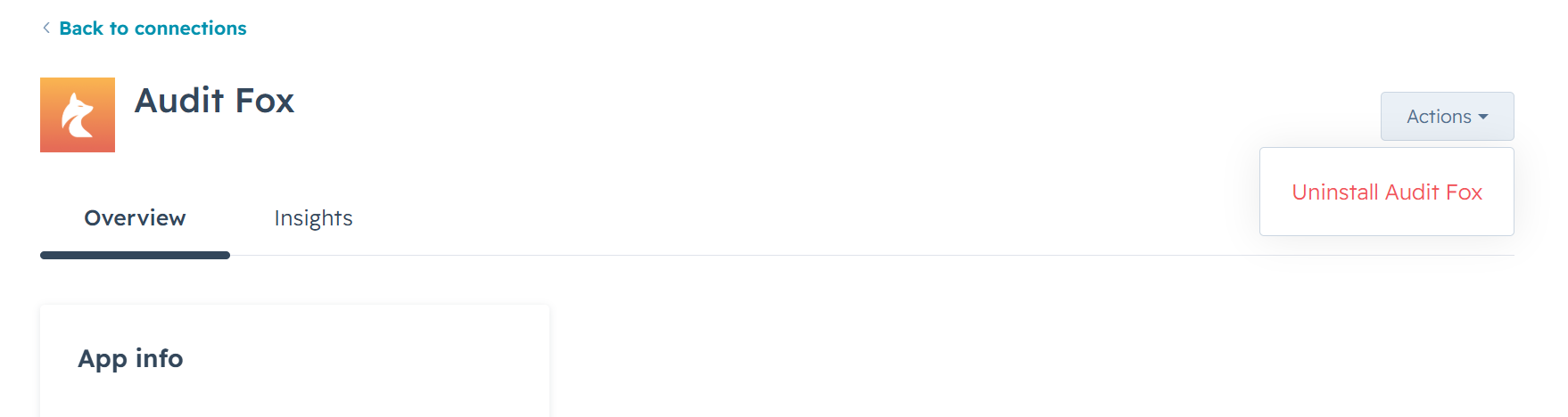
From HubSpot: Head to your HubSpot Settings > Integrations, find Audit Fox, and disconnect it from there.
Uninstalling the app
Like all third-party HubSpot applications, Audit Fox can be easily uninstalled from your HubSpot account. For this, head to Settings > Integrations in your HubSpot account, find Audit Fox, and follow HubSpot's uninstall flow.
Need help? Stuck? We’re here
You're now equipped to turn your HubSpot data chaos into actionable insights. Start with that first comprehensive audit, tackle the critical risk issues, and watch your scores improve.
If you’re stuck anywhere or things don’t work as expected, hit that ‘Help’ button on your Audit Fox dashboard and someone will get in touch with you.
Happy auditing! 🦊